

When it comes to Shopify websites, page speed affects not only SEO rankings and conversion rates, but also advertising ROI. Although apps and images are commonly responsible for slowing down websites, one of the main factors that affects page speed is actually the theme of your Shopify website. According to Google, a 1-second delay in page load can reduce conversions by up to 20%. Additionally, Shopify has found that faster websites consistently outperform slower ones across all traffic sources. Still, many store owners use themes with attractive designs that secretly harm store functionality.
Why Shopify Themes Play an Important Role in Performance?
Google’s Core Web Vitals study shows that JavaScript-heavy pages render 40-60 % slower to become interactive compared to JavaScript-neutral pages. 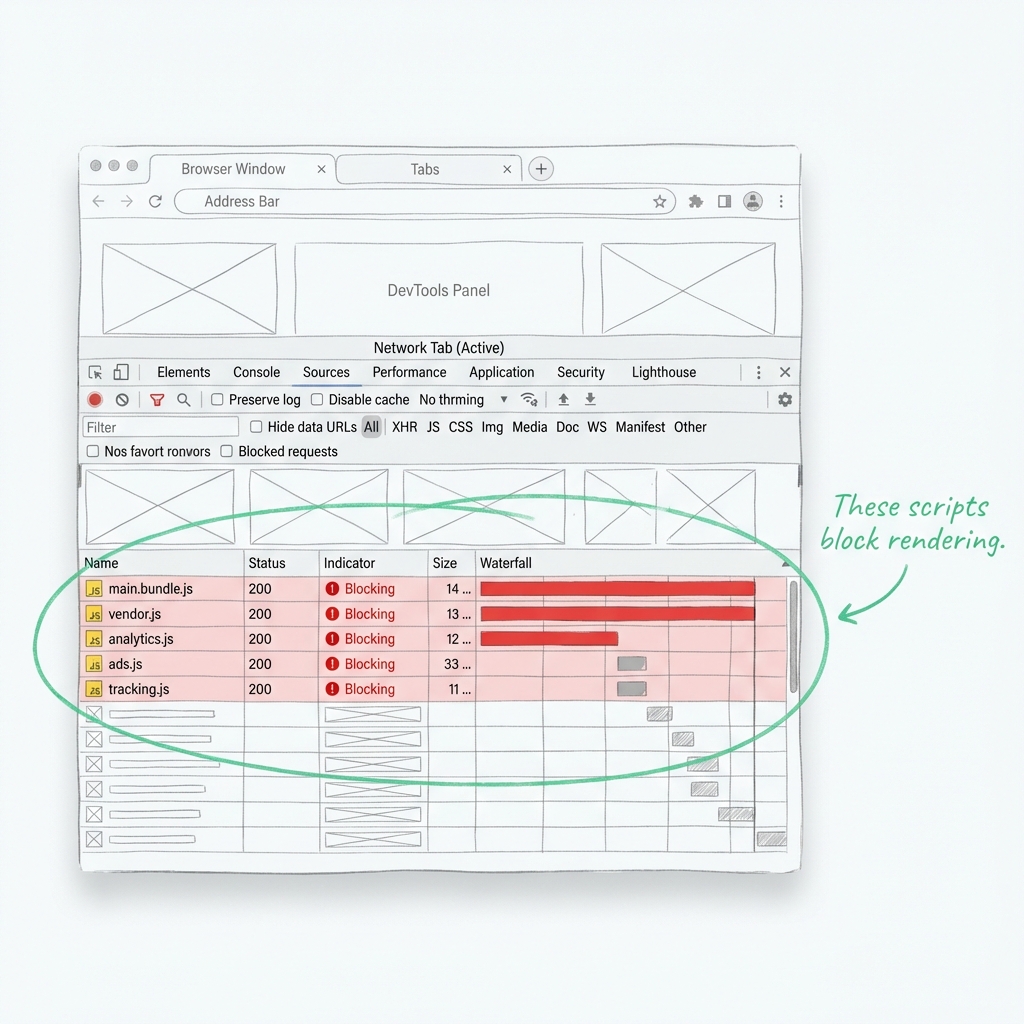 A Shopify theme controls how your store’s front-end loads, renders, and interacts with users. It shows:
- How much CSS and JavaScript are loaded per page
- Whether assets block rendering
- How images and fonts are handled
- How quickly pages become interactive
Even with fast hosting and a CDN, a poorly optimized theme can balance those advantages.
How Shopify Themes Directly Impact Website Speed
Code Quality
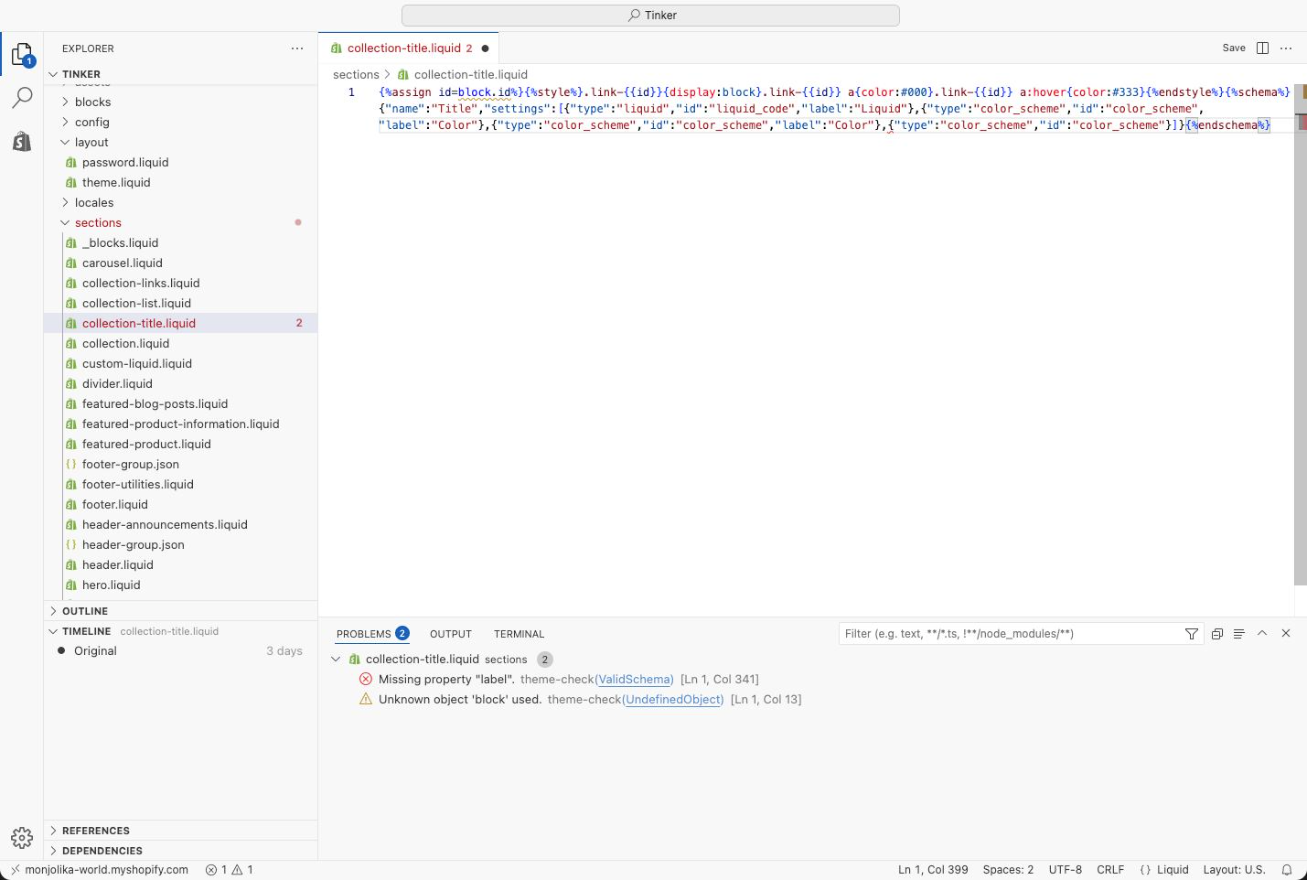 Fast Shopify themes depend heavily on clean, efficient code Code quality is also a crucial factor that impacts Shopify theme speed. The quality and efficiency of code in a Shopify theme also determine the speed. Below are the effects of code quality on performance:
- Execution speed: Structured Liquid, CSS, and JavaScript code translates to faster execution speed.
- Reduces page weight: Cleaner code is free from duplications as well as unnecessary logic. Therefore, the size of the file will be reduced.
- Less render-blocking scripts: A good quality theme should not use scripts that block the rendering of the webpage.
- Better maintainability: Clean code helps make code more maintainable in several ways. Optimizations become easier
Poorly coded themes often load features globally, even if they’re never used, which slows down every page. Expert Tip Use Shopify Theme Check, which can scan your theme for inefficient Liquid logic, deprecated patterns, and performance warnings before scaling your store.
Theme File Size & Asset Management
Why lighter themes load faster The overall size of a Shopify theme is a major factor in page load time, particularly for mobile connections. Key performance impacts include:
- Larger CSS files contribute to First Contentful Paint time (FCP)
- Heavy JavaScript bundles delay interactivity
- Having multiple font files increases network calls
- Unused assets contribute to overall page weight
According to performance analysis, an additional 500KB of page weight results in an increase in loading time of up to 1 second on mobile devices. Fast themes prioritize:
- Modular CSS loading
- Minimal JavaScript
- Limited font families
- Smart asset reuse
Expert Tip Aim to keep your homepage under 2MB total page size for optimal mobile performance.
Mobile-First Optimization
Why Shopify themes must prioritize mobile speed Since a large portion of Shopify traffic is generated through smartphones, mobile performance is a very important aspect. But most themes include desktop functionality for mobile devices. Common mobile theme issues:
- Animations designed for use on the desktop and on phones
- High-resolution images not resized for mobile
- Complex layouts will increase the DOM size.
- Touch delays due to heavy JavaScript
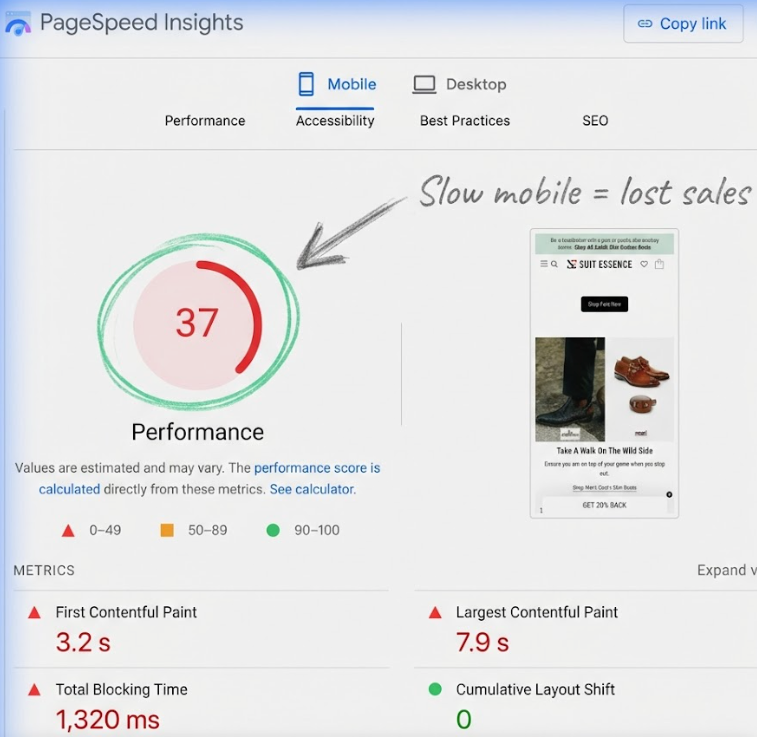 Google finds that using Core Web Vitals, pages not optimized for mobile devices experience lower levels of engagement and conversion. Fast Shopify theme:
- Makes use of responsive layouts effectively
- Loads fewer scripts on mobile
- Optimizes the responsiveness of taps as well as scrolls.
- Prioritize mobile Largest Contentful Paint (LCP)
Expert Tip Always test theme demos on real mobile devices, not just desktop simulators.
Image Handling & Lazy Loading
How themes control image performance Images are the heaviest elements on most Shopify stores, and themes decide how images are loaded and displayed.
Poor image handling results in:
- Slower LCP
- Higher data usage
- Delayed visual stability
Well-optimized themes support:
- Native lazy loading
- Responsive image sizes
- Proper
tags instead of background images
- Optimized image rendering for product grids
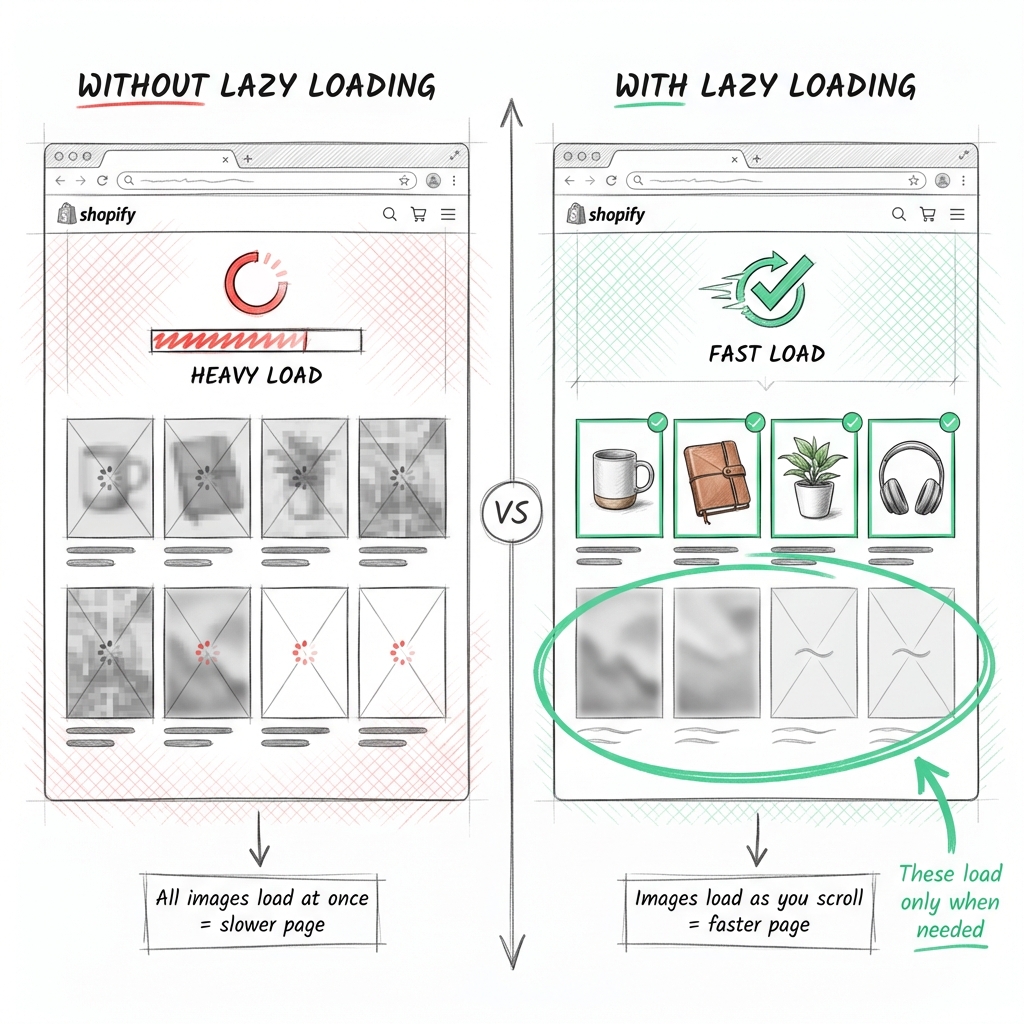 Studies show that optimized image loading alone can improve page speed by 25–40%. Expert Tip Select themes that work well with the built-in responsive image system on Shopify instead of using custom scripts.
JavaScript Usage & Interaction Speed
Why too much JS slows Shopify themes JavaScript manages dynamic features such as filters, sliders, and quick views, but too much of it hurts speed. Performance risks of heavy JavaScript:
- Delayed add-to-cart actions
- Laggy scrolling
- Poor Interaction to Next Paint (INP)
- Higher Total Blocking Time (TBT)
What this means is that users respond much more to delay in interactions rather than delay in visual rendering. This is supported by SEMrush’s UX research. Fast themes:
- Load scripts only when needed
- Defer non-essential JavaScript
- Avoid large libraries
- Keep interactions lightweight
Expert Tip A theme that loads JavaScript on every page, even when that code isn’t being used, is a sign of a performance problem.
Built-In Features vs Performance Trade-Offs
More features don’t always mean better themes Many Shopify themes advertise advanced features, but each feature contributes weight. Examples:
- Slides add JS + images
- Mega menus increase DOM size
- Animations increase execution time
- Popups add extra scripts
While features improve design flexibility, they can slow down page rendering if not modular. The fastest Shopify themes:
- Allow disabling unused sections
- Load features conditionally
- Avoid global scripts
Expert Tip Choose themes that let you turn features off completely, not just hide them visually.
Free vs Premium Shopify Themes: Speed Comparison
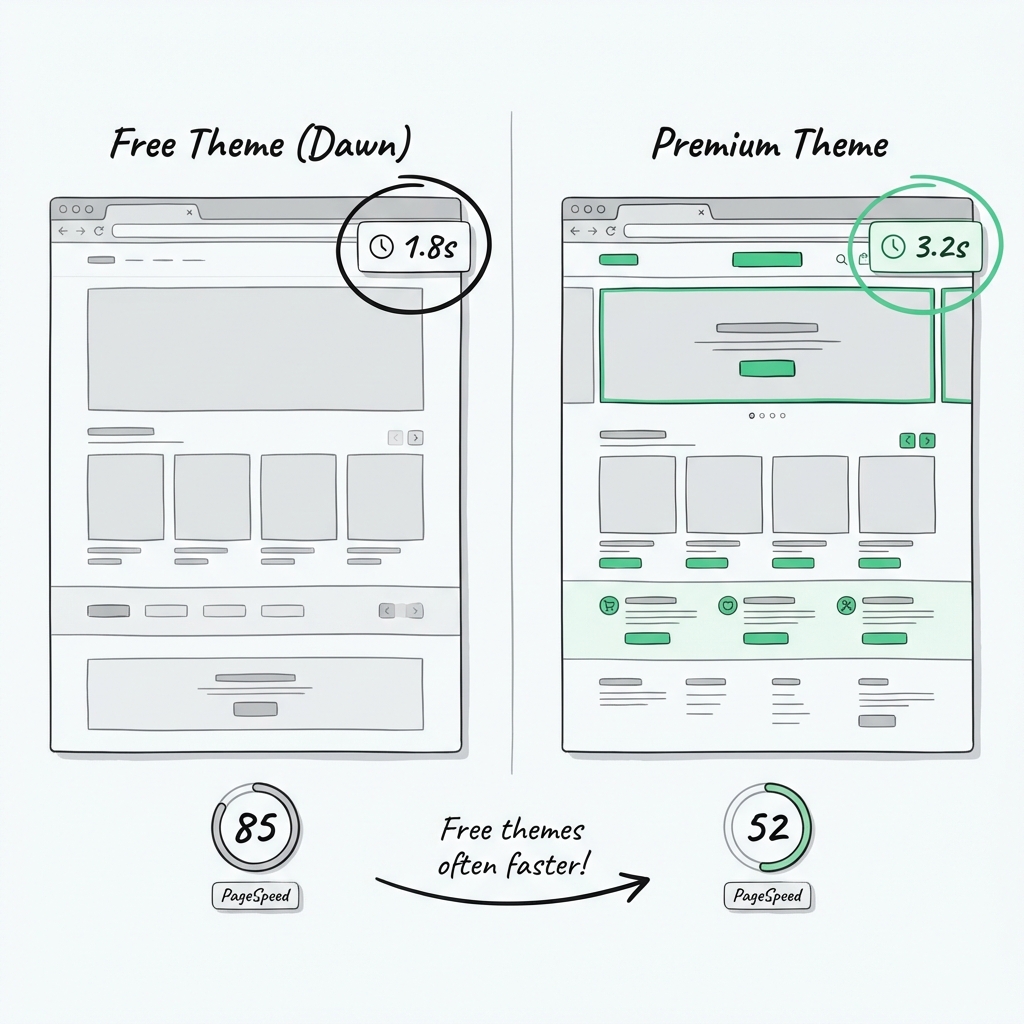 two Shopify demos with load times displayed Probably the biggest assumption in most store owners’ minds is that the premium Shopify themes are automatically faster. In reality, speed depends less on price and more on how the theme is built. Let’s break it down clearly.
Free Shopify Themes: Speed Strengths & Limitations
The free themes provided by Shopify, such as ‘Dawn’ and ‘Refresh,’ are either developed or approved by Shopify directly. Because of this, these themes are often expected to meet certain performance levels. Why free themes often load faster:
- Minimal design elements and animations
- Clean, lightweight Liquid and CSS
- Fewer built-in features are loading globally
- Optimized for Shopify’s latest architecture
Performance tests often reveal that free themes in Shopify score higher in Core Web Vitals metrics right out of the box, and in particular for mobile devices. This makes them a perfect choice for a performance-focused brand. Where free themes fall short:
- Limited design flexibility
- Fewer advanced merchandising tools
- More reliance on apps for functionality
Premium Shopify Themes: Power vs Performance
Premium themes are designed for flexibility, branding, and conversion optimization. In most cases, this flexibility comes at a performance cost. Advantages of premium themes:
- Advanced layout options
- Built-in marketing features
- Rich animations and interactions
- Industry-specific templates
Potential speed drawbacks:
- Larger JavaScript bundles
- Features are loaded even when unused
- Higher DOM complexity
- Increased HTTP requests
Shopify performance audits conducted on various Shopify stores show that premium themes can cause a 20 – 40% heavier in page weight compared to free themes if not carefully optimized.
Real-World Speed Comparison (What Actually Matters)
When comparing free vs premium themes, these issues are far more important than the cost:
- Theme architecture: Modular loading vs global loading
- Feature control: Can features be fully disabled?
- Mobile optimization: Separate mobile logic or shared desktop code?
- Script management: Deferred vs blocking JavaScript
An optimized premium theme will perform better than a poorly set-up free theme, but usually a free theme will have a better performance.
Which Should You Choose for Speed?
Choose a free theme if:
- Speed and Core Web Vitals are top priorities
- You rely on apps for added functionality
- You want a clean, scalable foundation
Choose a premium theme if:
- You need advanced layouts or storytelling
- You can audit and optimize performance
- You plan to disable unused features
Expert Insight Speed issues usually don’t come from a theme price. They are from feature overload, poor configuration, and excessive apps layered on top of the theme.
How Speed Booster Tools Complement Shopify Themes
When the store grows in size, new applications, tracking scripts, marketing pixels, or dynamic content begin to contribute to weight in the frontend. At this point, it becomes difficult to achieve a good Core Web Vitals score through theme-level optimizations. This is where tools like Sonic Page Speed Booster for Shopify helps. Instead of replacing your theme, these tools work on top of it to control how and when assets load, ensuring your store stays fast even as complexity increases.
Theme + Speed Booster = Sustainable Performance
The most consistently fast Shopify stores don’t rely on a single solution. They combine:
- A clean, lightweight theme
- Controlled app usage
- Ongoing performance optimization through a speed booster
This layered approach ensures that speed improvements last, not just at launch, but as the store scales.
Wrapping It Up
The speed of Shopify Themes depends on smart choices, rather than the price tag or the design alone. Even a free Shopify theme or a premium Shopify theme can both deliver excellent performance when they are built with clean code, optimized files, and a mobile-first layout, but they can also become slow if overloaded with unused features, heavy scripts, or excessive customization. Selecting an organized theme, not loading unnecessary apps, and a performance check ensures fast loading times, optimal Core Web Vitals, and conversions, proving that in Shopify, speed is all about how well your theme performs, rather than its appearance. If you still have some doubt about How to speed up your Shopify Store then you can get our Free Shopify Store Audit.

About Gaurav Radadiya
I am co-founder of Adfinite, where we build eCommerce solutions for growth and efficiency. I build highly efficient automations for inventory management, order processing, logistics, returns management, product listing and marketing.




